Purchase flows
Overview
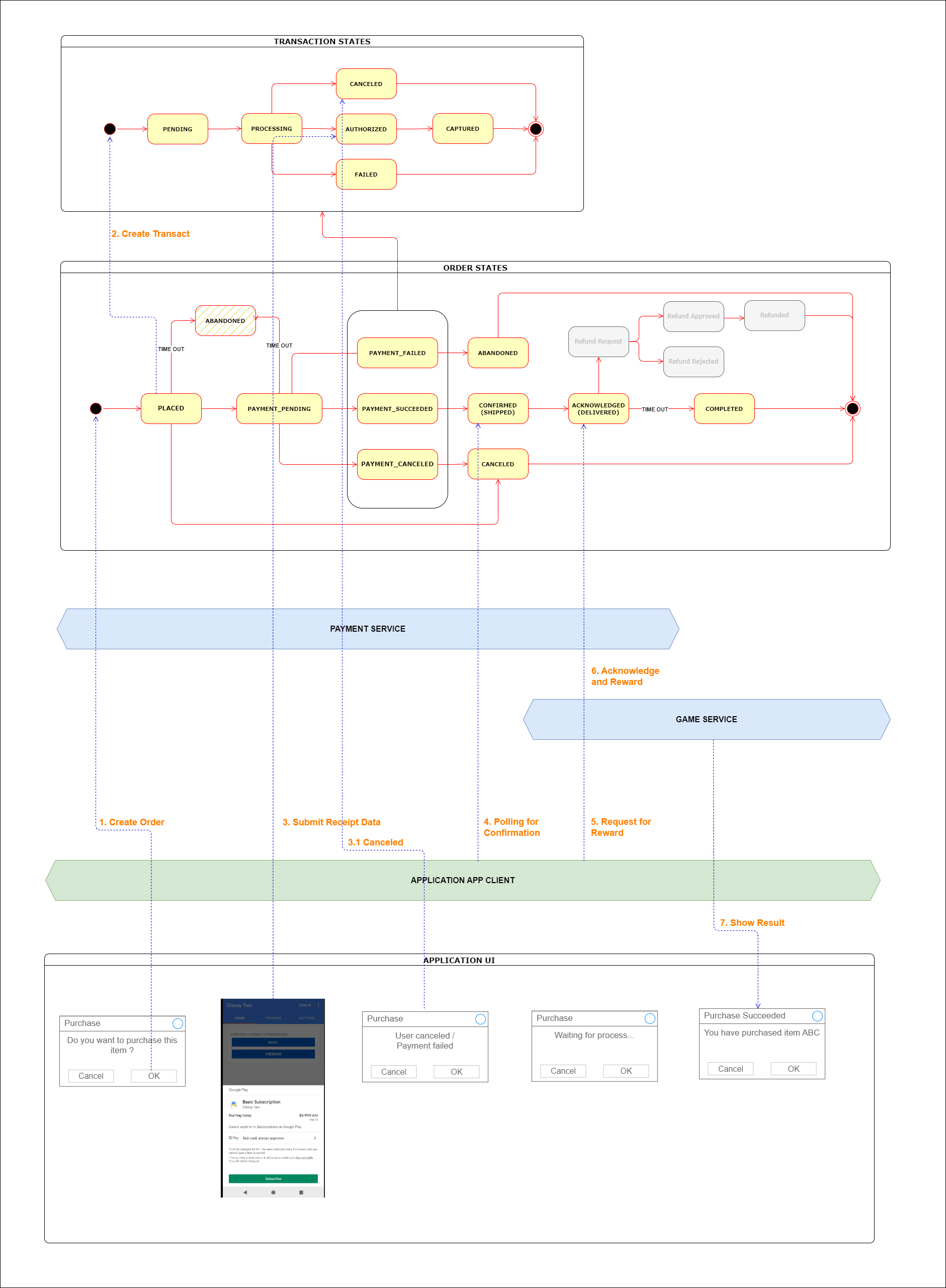
Related APis
| VERD | Endpoint | Parameters | Data | Response | Desc |
|---|---|---|---|---|---|
GET | /api/orders/create-one-with-items | OrderCreateDto | Order | Create an order |
export enum PgProviderMethod {
  VERIFY_RECEIPT = "verify-receipt", // Only support receipt verification for authorizing transaction
  // More methods will be added later
}

export class OrderCreateDto {
  // The user id that create the order
  userId: string;

  // [Optinal] Expect subtotal of the order
  expectSubtotal?: number;

  // [Optinal] Currency code (default VND)
  currencyCode?: CurrencyCode;

  // [Optinal] Note for admin
  note?: string;

  // Order items details
  itemDtos?: OrderItemCreateDto[];

  // Init transaction
  pgTransactDto?: OrderTransactCreateDto;
}

export class OrderItemCreateDto {
  // Item name
  name: string;

  // Item slug (url friendly)
  slug: string;

  // Item quantity
  quantity: number;

  // Price per item
  pricePerItem: number;

  // Additional options
  options: Record<string, string>;
}

export class OrderTransactCreateDto {
  // Provider name
  providerName: string;

  // Support authorized method, if the method is not support by provider, transaction will failed
  providerMethods: PgProviderMethod[];

  // Any custom data
  customData?: any;

  // Authorize data immediately, do not need to submit separate request
  authorizeDto?: PgTransactAuthorizeDto;
}
| VERD | Endpoint | Parameters | Data | Response | Desc |
|---|---|---|---|---|---|
GET | /api/pg-transacts/authorize/:transactId | transactId | PgTransactAuthorizeDto | PgTransact | Authorize an transaction |
export class PgTransactAuthorizeDto {
  // The method to authorize
  method: PgProviderMethod;

  // Receipt data
  withReceipts?: PgTransactAuthorizeReceiptDto[];
}

export class PgTransactAuthorizeReceiptDto {
  // Receipt data of Android or iOS, if receipt is json data, it must be stringify
  raw: string;
}
Main payment flow (Receipt verification)
Step 1 - Create order
Call POST /api/orders/create-one-with-items
With data
{
  "appId": "my-app-id",
  "requestId": "123456",
  "userId": "user1",
  "note": "This is order",
  "currencyCode": "USD",
  "itemDtos": [
    {
      "name": "Game Item 1",
      "slug": "game.item1",
      "quantity": 1,
      "pricePerItem": 10.99,
      "options": {
        "variant": "large-pack"
      }
    }
  ],
  "pgTransactDto": {
    "providerName": "google-play.test",
    "providerMethods": ["verify-receipt"]
  }
}
Will response
{
  "appId": "my-app-id",
  "requestId": "123456",
  "userId": "1",
  "note": "This is order",
  "currencyCode": "USD",
  "pgTransactDto": {
    "providerName": "google-play.test",
    "providerMethods": ["verify-receipt"]
  },
  "subTotal": 10.99,
  "id": "58633141051113266",
  "_guid": "order_SACKc4UkrHspuViNqYOZimoe",
  "createdBy": "__system",
  "createdAt": "2023-07-04T17:43:54.015Z",
  "updatedAt": "2023-07-04T17:43:54.015Z",
  "status": "PLACED",

  "pgTransacts": [
    {
      "orderId": "58633141051113266",
      "userId": "1",
      "amount": 10.99,
      "currencyCode": "USD",
      "providerName": "google-play.test",
      "providerMethods": ["verify-receipt"],
      "id": "58633179629460676",
      "_guid": "pgtran_SACKc4UkrHKJnLR4XJizvkd8",
      "status": "PENDING"
    }
  ],
  "items": [
    {
      "name": "Game Item 1",
      "slug": "game.item1",
      "quantity": 1,
      "pricePerItem": 10.99,
      "options": {
        "variant": "large-pack"
      },
      "orderId": "58633141051113266",
      "id": "58633128914505676",
      "_guid": "orditem_SACKc4UkrHgumT1EHmYv7lb0",
      "createdAt": "2023-07-04T17:43:54.015Z",
      "updatedAt": "2023-07-04T17:43:54.015Z"
    }
  ]
}
Step 1A - Alternative create order and submit receipt at the same time
Call POST /api/orders/create-one-with-items
With data
{
  "appId": "my-app-id",
  "requestId": "123456",
  "userId": "user1",
  "note": "This is order",
  "currencyCode": "USD",
  "itemDtos": [
    {
      "name": "Game Item 1",
      "slug": "game.item1",
      "quantity": 1,
      "pricePerItem": 10.99,
      "options": {
        "variant": "large-pack"
      }
    }
  ],
  "pgTransactDto": {
    "providerName": "google-play.test",
    "providerMethods": ["verify-receipt"],
    "authorizeDto": {
      "method": "verify-receipt",
      "withReceipts": [{ "raw": "raw-receipt-data" }]
    }
  }
}
If add receipt when create order, can ignore step 2 and process to step 3
Step 2 - Submit receipt data
Call POST /api/pg-transacts/authorize/:transactId (replace transactId with 58633179629460676)
With data
{
  "method": "verify-receipt",
  "withReceipts": [{ "raw": "receipt-data" }]
}
Will response
{
  "id": "59233474018086654",
  "_guid": "pgtran_SACM3f5YYbC25RFu4nXu5io4",
  "createdAt": "2023-07-04T17:53:54.342Z",
  "updatedAt": "2023-07-04T17:53:58.126Z",
  "createdBy": "__system",
  "updatedBy": "__system",
  "appId": "my-app-id",
  "requestId": "123456",
  "deletedBy": null,
  "userId": "1",
  "amount": 10.99,
  "capturedAmount": null,
  "currencyCode": "USD",
  "status": "PENDING",
  "providerName": "google-play.test",
  "providerMethods": ["verify-receipt"],
  "orderId": "59233432932887805",
  "pendingAction": "receipt-verified", // Receipt is ok
  "customData": null,
  "priority": 1,
  "failedReason": null,
  "auditMessages": null
}
Step 3 - Polling for order status
Call GET /api/orders/:orderId (replace orderId with 58633141051113266)
{
  "id": "59233432932887805",
  "_guid": "order_SACM3f5YYbdOmBeBlwQ91FBj",
  "userId": "1",
  "status": "CONFIRMED", // Order is confirm
  "subTotal": 10.99,
  "currencyCode": "USD",
  "note": "This is order"
}
Wait for status of order to be "CONFIRMED"
Step 4 - Acknowledge and reward
Do Acknowledge and Reward on game or app server
Cancel payment flow
Step 1 - Create order
Create order as step 1/1A in main flow If order was created for long time with no action (authorize, cancel), order will be mark as abandoned
Step 2 - Request to cancel
Call GET /api/pg-transacts/cancel/:transactId (replace transactId with 58633179629460676)
with data
{
  "auditMessage": "User canceled"
}
will response
{
  "id": "111941923563008708",
  "_guid": "pgtran_3Dn8pGnew3ea4KF5OKkD6nnfhC",
  "createdAt": "2023-07-05T08:32:23.377Z",
  "updatedAt": "2023-07-05T08:32:25.422Z",
  "deletedAt": null,
  "createdBy": "__system",
  "updatedBy": "__system",
  "deletedBy": null,
  "userId": "1",
  "amount": 10.99,
  "capturedAmount": null,
  "currencyCode": "USD",
  "status": "PENDING",
  "providerName": "google-play.test",
  "providerMethods": ["verify-receipt"],
  "orderId": "111941860280033614",
  "pendingAction": "mark-as-canceled",
  "customData": null,
  "priority": 1,
  "failedReason": null,
  "auditMessages": ["User canceled"]
}
Failed payment flow
Step 1 - Create order
Create order as step 1/1A in main flow
Step 2 - Submit failed receipt
Submit faked receipt and order will be marked a failed